
Kyoto attractions gallery
5 sub-tasks run at once, each finds its own pictures, and the results merge into one gallery.
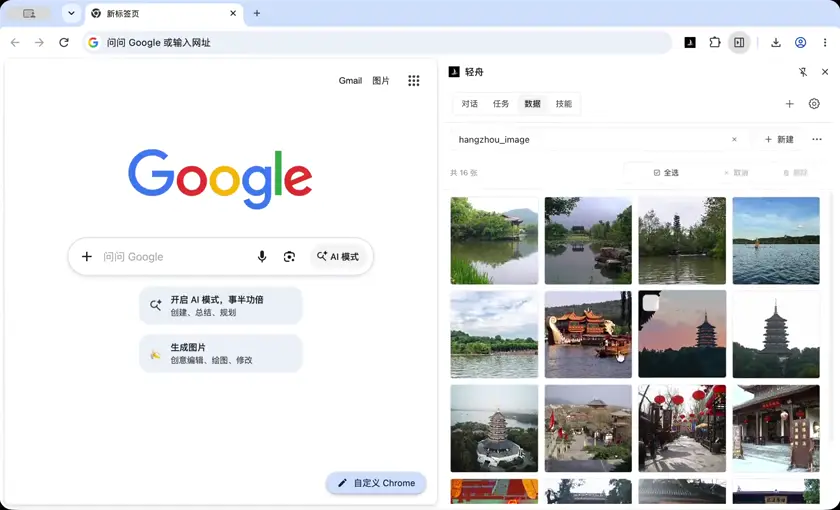
新建图集 hangzhou_image,为西湖、灵隐寺、雷峰塔、西溪湿地、宋城这 5 个杭州景点,各开一个任务,同时进行:每个子任务去维基百科找该景点的 3 张代表性图片,并写入图集中。
历史思考 1
1/7
用户要求:新建图集 hangzhou_image,为 5 个杭州景点各开一个子任务并行,每个子任务去维基百科找 3 张代表性图片写入图集。
我需要:
1. 先创建图集(collect_images 会自动创建表,但可以先创建空表?图集是特殊的 data_store 表,collect_images 创建。可以先不建,让子任务写入同一个 table 名)。
2. 用 manage_sessions.create 派发 5 个子任务,每个子任务去维基百科找 3 张图片并通过 collect_images 写入 hangzhou_image 表。
3. 等待所有完成,然后验证表行数。
需要注意统一结果契约:表名 hangzhou_image,dedupField sourceKey(默认),每个子任务 3 张。
先创建 goal 吗?这是个多子任务采集任务,可用 manage_goal。可以考虑创建 goal。
先派发子任务。每个子任务的 firstMessage 需要写明:
- 打开维基百科对应景点页面(中文或英文维基)
- 用 list_images 找候选,选择 3 张代表性图片
- 用 collect_images 写入 table: hangzhou_image
- 报告结果
注意子任务有自己的 session,工具调用独立。图集表是全局 data_store,应该可以共享写入。collect_images 的 table 参数指定同名即可。
先创建 5 个 session。也可以先创建一个空表头?collect_images 会创建 kind=image_collection 表。如果我先用 data_store create_table 创建普通表叫 hangzhou_image,可能冲突。所以让第一个子任务(或我自己先采集一张?)不行。更稳妥:先自己创建图集?没有工具直接创建空图集,collect_images 需要图片。
方案:直接让子任务调用 collect_images table:"hangzhou_image";第一个写入的会创建图集表,其余追加。应该支持。
不过并行同时写入同一表可能有冲突风险,但工具应该串行处理工具调用。
我先创建 goal,然后 create 5 个 session,然后 wait all。
firstMessage 示例:
"任务:在维基百科查找杭州景点「西湖」的 3 张代表性图片,并写入图集 Data 表 hangzhou_image。
步骤:
1. open_tab 打开中文维基百科页面 https://zh.wikipedia.org/wiki/西湖(若打不开用英文 https://en.wikipedia.org/wiki/West_Lake)
2. 用 list_images 查看页面图片候选,依据 alt/说明/附近正文判断哪些是该景点代表性图片(景点实景、地标建筑等,避免图标、logo、地图、小图标)
3. 用 collect_images({table:"hangzhou_image", targets:[...]}) 采集 3 张;如页面图片不足 3 张,可打开维基共享资源分类页补充
4. 确认写入成功,返回实际采集数量、图片说明和 assetId
注意:只写入 hangzhou_image 表,不要创建其他表;每张图片记录代表景点。"
好,开始。
让我先 manage_goal create,然后 manage_sessions.create x5(可以并行在同一 block)。然后 wait。
实际上先创建 goal 再创建 sessions,都在同一 block 也可以,但 create 依赖不了 goal。就一起发吧。
注意 manage_sessions.create 返回 sessionId。需要拿到再 wait。
那么第一步:create goal + 5 creates 放同一 block。之后 wait。
历史思考 2
2/7
Now wait for all 5 sessions.
历史思考 3
3/7
All 5 completed. Table has 16 rows. Let me verify by reading the table via run_script inner mode to group by pageTitle, and check counts per attraction. Also need to add a "景点" field? The user wants 3 images per attraction in the gallery. There's pageTitle which identifies. But better to add a 景点 column for clarity? The criteria said "并有景点归属字段可核对". I could add a "景点" column and fill via run_script. Let's verify with run_script inner: read table rows, group by pageTitle, output counts, and also add 景点 field based on pageTitle mapping. Rows count 16: 西湖 3, 灵隐寺 3, 雷峰塔 3, 西溪湿地 3, 宋城 4. That's 16. I'll add 景点 field via data_store update in script (per row), using pageTitle mapping. Use run_script inner with tools.data_store. But updates must use rowId and expectedValue... field 景点 doesn't exist yet, so omit expectedValue. Let's do it.
历史思考 4
4/7
All 16 rows assigned 景点 field. Stats: 西湖 3, 灵隐寺 3, 雷峰塔 3, 西溪湿地 3, 宋城 4. Now check if any rows have status not ready, and check captions. Let's do one verification query with small output: count statuses and list per-spot captions/alt short. Let me run a quick script returning compact sample.
历史思考 5
5/7
灵隐寺 rows have no pageUrl? That suggests they were collected via urls (Commons) — page blank. Let me check sourceKey for those rows to verify they're from Wikipedia/Commons. Let me quickly check. Also 灵隐寺 3 rows at 1280px — likely commons originals. Fine but need to verify they're Lingyin-related. Let me check the sourceKey values for 灵隐寺 rows.
历史思考 6
6/7
灵隐寺 3 rows come from Commons files with names containing Lingyin — legit. But pageUrl empty (collected via url). Could fill pageUrl with the Wikimedia Commons category page or the zh.wikipedia page for traceability. Let's fill pageUrl for those 3 rows with "https://zh.wikipedia.org/wiki/灵隐寺" ? Better: Commons file page. Actually the sourceKey has "#<url>". Setting pageUrl to the Commons file page would be more accurate but we don't know filenames exactly... we do: thumb/4/45/Lingyin_Temple_22.JPG etc. Could construct https://commons.wikimedia.org/wiki/File:Lingyin_Temple_22.JPG. Simpler: set pageUrl to Commons category "https://commons.wikimedia.org/wiki/Category:Lingyin_Temple". Hmm, precision matters less; just note it. Let me update those pageUrl to the Commons category page for traceability. Use update with expectedValue "" (field exists as empty string). Rows: row:338359d0-98a4-4ca8-b1de-1f390a5d69e2 and two others. I need rowIds. Let me do it in a script: filter 景点=灵隐寺 and pageUrl empty → update pageUrl to Category page. Actually, I could set individual file pages by deriving from src. That's nicer. From src: https://thumb.wikimedia.org/wikipedia/commons/thumb/c/c2/Hangzhou_Lingyin-Temple_20161003.jpg/1280px-... → File page: https://commons.wikimedia.org/wiki/File:Hangzhou_Lingyin-Temple_20161003.jpg. Let's do that via script.
最近思考
7/7
Now checkpoint and complete goal.

Verify final: 16 rows, 5 spots each ≥3, all status ready, 景点 field present. Done.

Let me checkpoint then complete.
操作创建
Objective用 5 个并行子任务在维基百科为西湖、灵隐寺、雷峰塔、西溪湿地、宋城各采集 3 张代表性图片,全部写入图集 hangzhou_image
Criteria5 个子任务全部完成;hangzhou_image 图集中 5 个景点各至少 3 张图片(共 15 张左右),并有景点归属字段可核对
操作创建
激活是
Goal10 个字段
Cleared否
Runtime Updated At2026-10-23 10:36:13
发给子任务的 prompt
任务:在维基百科查找杭州景点「西湖」的 3 张代表性图片,写入已有图集 Data 表 hangzhou_image。
步骤:
1. open_tab 打开 https://zh.wikipedia.org/wiki/西湖 ;若打不开或页面无图,改用英文 https://en.wikipedia.org/wiki/West_Lake 。
2. 用 list_images 扫描页面图片候选,依据 alt、title、附近标题与正文判断哪些是该景点代表性实景图片;排除图标、logo、地图示意、小尺寸缩略标记、人脸/人物合影等非景点图片。
3. 选出 3 张后,调用 collect_images({table:"hangzhou_image", targets:[...]}),targets 使用 list_images 返回的 target 原样传入;表名必须是 hangzhou_image,不要新建别的表。
4. 若页面候选不足 3 张,可再打开中文维基共享资源分类页(如 https://commons.wikimedia.org/wiki/Category:West_Lake)继续用 list_images 找候选并用 url 形式补充采集,仍然写入 hangzhou_image。
5. 采集后用 data_store list table="hangzhou_image" 确认本景点相关行已写入。
最后回报:实际采集张数、每张的说明/alt 文本、assetId 或 sourceKey、失败原因(若有)。这是"西湖"子任务,必须保证至少 3 张与西湖相关的图片。
发给子任务的 prompt
任务:在维基百科查找杭州景点「灵隐寺」的 3 张代表性图片,写入已有图集 Data 表 hangzhou_image。
步骤:
1. open_tab 打开 https://zh.wikipedia.org/wiki/灵隐寺 ;若打不开或页面无图,改用英文 https://en.wikipedia.org/wiki/Lingyin_Temple 。
2. 用 list_images 扫描页面图片候选,依据 alt、title、附近标题与正文判断哪些是该景点代表性实景图片;排除图标、logo、地图示意、小尺寸标记、人物合影等非景点图片。
3. 选出 3 张后,调用 collect_images({table:"hangzhou_image", targets:[...]}),targets 使用 list_images 返回的 target 原样传入;表名必须是 hangzhou_image,不要新建别的表。
4. 若候选不足 3 张,可再打开 https://commons.wikimedia.org/wiki/Category:Lingyin_Temple 继续找候选,用 url 形式补充采集,仍写入 hangzhou_image。
5. 采集后用 data_store list table="hangzhou_image" 确认本景点相关行已写入。
最后回报:实际采集张数、每张说明/alt、assetId 或 sourceKey、失败原因(若有)。必须保证至少 3 张与灵隐寺相关的图片。
发给子任务的 prompt
任务:在维基百科查找杭州景点「雷峰塔」的 3 张代表性图片,写入已有图集 Data 表 hangzhou_image。
步骤:
1. open_tab 打开 https://zh.wikipedia.org/wiki/雷峰塔 ;若打不开或页面无图,改用英文 https://en.wikipedia.org/wiki/Leifeng_Pagoda 。
2. 用 list_images 扫描页面图片候选,依据 alt、title、附近标题与正文判断哪些是该景点代表性实景图片;排除图标、logo、地图示意、小尺寸标记、人物合影等非景点图片。
3. 选出 3 张后,调用 collect_images({table:"hangzhou_image", targets:[...]}),targets 使用 list_images 返回的 target 原样传入;表名必须是 hangzhou_image,不要新建别的表。
4. 若候选不足 3 张,可再打开 https://commons.wikimedia.org/wiki/Category:Leifeng_Pagoda 继续找候选,用 url 形式补充采集,仍写入 hangzhou_image。
5. 采集后用 data_store list table="hangzhou_image" 确认本景点相关行已写入。
最后回报:实际采集张数、每张说明/alt、assetId 或 sourceKey、失败原因(若有)。必须保证至少 3 张与雷峰塔相关的图片。
发给子任务的 prompt
任务:在维基百科查找杭州景点「西溪湿地」的 3 张代表性图片,写入已有图集 Data 表 hangzhou_image。
步骤:
1. open_tab 打开 https://zh.wikipedia.org/wiki/西溪湿地 ;若打不开或页面无图,改用英文 https://en.wikipedia.org/wiki/Xixi_National_Wetland_Park 。
2. 用 list_images 扫描页面图片候选,依据 alt、title、附近标题与正文判断哪些是该景点代表性实景图片;排除图标、logo、地图示意、小尺寸标记、人物合影等非景点图片。
3. 选出 3 张后,调用 collect_images({table:"hangzhou_image", targets:[...]}),targets 使用 list_images 返回的 target 原样传入;表名必须是 hangzhou_image,不要新建别的表。
4. 若候选不足 3 张,可再打开 https://commons.wikimedia.org/wiki/Category:Xixi_National_Wetland_Park 继续找候选,用 url 形式补充采集,仍写入 hangzhou_image。
5. 采集后用 data_store list table="hangzhou_image" 确认本景点相关行已写入。
最后回报:实际采集张数、每张说明/alt、assetId 或 sourceKey、失败原因(若有)。必须保证至少 3 张与西溪湿地相关的图片。
发给子任务的 prompt
任务:在维基百科查找杭州景点「宋城」(Songcheng / Hangzhou Songcheng) 的 3 张代表性图片,写入已有图集 Data 表 hangzhou_image。
步骤:
1. open_tab 打开 https://zh.wikipedia.org/wiki/宋城 ;若打不开或页面无图,可试 https://en.wikipedia.org/wiki/Songcheng_Park 或搜索维基百科站内 "Songcheng"。
2. 用 list_images 扫描页面图片候选,依据 alt、title、附近标题与正文判断哪些是该景点代表性实景图片;排除图标、logo、地图示意、小尺寸标记、人物合影等非景点图片。
3. 选出 3 张后,调用 collect_images({table:"hangzhou_image", targets:[...]}),targets 使用 list_images 返回的 target 原样传入;表名必须是 hangzhou_image,不要新建别的表。
4. 若维基百科条目候选不足 3 张,去 https://commons.wikimedia.org/wiki/Special:Search?search=Songcheng 或 Category:Songcheng_Park 找候选,用 url 形式补充采集,仍写入 hangzhou_image。
5. 采集后用 data_store list table="hangzhou_image" 确认本景点相关行已写入。
最后回报:实际采集张数、每张说明/alt、assetId 或 sourceKey、失败原因(若有)。必须保证至少 3 张与宋城相关的图片;若确实无法凑够 3 张,明确说明实际数量与原因。
任务
西湖图片采集
灵隐寺图片采集
雷峰塔图片采集
西溪湿地图片采集
宋城图片采集
运行代码
async () => {
  // 校验 hangzhou_image 图集:按景点分组统计,并补充「景点」归属字段
  let stage = "init";
  try {
    stage = "list";
    const res = await tools.data_store({ action: "list", table: "hangzhou_image", limit: 200 });
    const rows = res.rows || [];
    trace("rows", rows.length);
    const map = [
      ["西湖", /西湖|West_Lake/i],
      ["灵隐寺", /灵隐|Lingyin/i],
      ["雷峰塔", /雷峰|Leifeng/i],
      ["西溪湿地", /西溪|Xixi/i],
      ["宋城", /宋城|Songcheng/i]
    ];
    const stat = {};
    stage = "update";
    let updated = 0;
    for (const r of rows) {
      const d = r.data || {};
      const hay = [d.pageTitle, d.pageUrl, d.src, d.alt, d.title, d.caption].filter(Boolean).join(" ");
      let spot = "未识别";
      for (const [name, re] of map) { if (re.test(hay)) { spot = name; break; } }
      stat[spot] = (stat[spot] || 0) + 1;
      if (d["景点"] !== spot) {
        await tools.data_store({ action: "update", table: "hangzhou_image", rowId: r.rowId, field: "景点", value: spot });
        updated++;
      }
    }
    return { ok: true, stage, total: rows.length, stat, updated };
  } catch (e) {
    trace("fail", { stage, message: e.message });
    return { ok: false, stage, error: e.message };
  }
}trace
inner.start
02:37:12
tool.start
02:37:12
tool.end
02:37:12
trace
02:37:12
tool.start
02:37:12
tool.end
02:37:13
tool.start
02:37:13
tool.end
02:37:13
tool.start
02:37:13
tool.end
02:37:13
tool.start
02:37:13
tool.end
02:37:13
tool.start
02:37:13
tool.end
02:37:13
tool.start
02:37:13
tool.end
02:37:13
tool.start
02:37:13
tool.end
02:37:13
tool.start
02:37:13
tool.end
02:37:13
tool.start
02:37:13
tool.end
02:37:13
tool.start
02:37:13
trace
result
{
  "ok": true,
  "stage": "update",
  "total": 16,
  "stat": {
    "西溪湿地": 3,
    "西湖": 3,
    "雷峰塔": 3,
    "宋城": 4,
    "灵隐寺": 3
  },
  "updated": 16
}运行代码
async () => {
  // 汇总校验 hangzhou_image:每个景点的行数、status、尺寸与说明(仅返回精简摘要)
  const res = await tools.data_store({ action: "list", table: "hangzhou_image", limit: 200 });
  const rows = res.rows || [];
  const bySpot = {};
  const badStatus = [];
  for (const r of rows) {
    const d = r.data || {};
    const s = d["景点"] || "未识别";
    bySpot[s] = bySpot[s] || { count: 0, items: [] };
    bySpot[s].count++;
    if (d.status !== "ready") badStatus.push({ spot: s, status: d.status });
    bySpot[s].items.push({
      alt: (d.alt || d.title || d.caption || "").slice(0, 40),
      w: d.width, h: d.height, page: (d.pageUrl || "").split("/wiki/")[1] || ""
    });
  }
  return { total: rows.length, bySpot, badStatus };
}trace
inner.start
02:37:15
tool.start
02:37:15
tool.end
02:37:15
result
{
  "total": 16,
  "bySpot": {
    "西溪湿地": {
      "count": 3,
      "items": [
        {
          "alt": "",
          "w": 330,
          "h": 220,
          "page": "%E8%A5%BF%E6%BA%AA%E6%BF%95%E5%9C%B0"
        },
        {
          "alt": "西溪湿地高庄",
          "w": 330,
          "h": 197,
          "page": "%E8%A5%BF%E6%BA%AA%E6%BF%95%E5%9C%B0"
        },
        {
          "alt": "西溪湿地西区",
          "w": 330,
          "h": 206,
          "page": "%E8%A5%BF%E6%BA%AA%E6%BF%95%E5%9C%B0"
        }
      ]
    },
    "西湖": {
      "count": 3,
      "items": [
        {
          "alt": "",
          "w": 960,
          "h": 720,
          "page": "%E8%A5%BF%E6%B9%96"
        },
        {
          "alt": "白堤与断桥",
          "w": 250,
          "h": 141,
          "page": "%E8%A5%BF%E6%B9%96"
        },
        {
          "alt": "",
          "w": 250,
          "h": 187,
          "page": "%E8%A5%BF%E6%B9%96"
        }
      ]
    },
    "雷峰塔": {
      "count": 3,
      "items": [
        {
          "alt": "",
          "w": 500,
          "h": 281,
          "page": "%E9%9B%B7%E5%B3%B0%E5%A1%94"
        },
        {
          "alt": "",
          "w": 250,
          "h": 187,
          "page": "%E9%9B%B7%E5%B3%B0%E5%A1%94"
        },
        {
          "alt": "",
          "w": 250,
          "h": 187,
          "page": "%E9%9B%B7%E5%B3%B0%E5%A1%94"
        }
      ]
    },
    "宋城": {
      "count": 4,
      "items": [
        {
          "alt": "宋城(条目信息框主图,园区实景,Song Dynasty City 297019",
          "w": 500,
          "h": 375,
          "page": "%E5%AE%8B%E5%9F%8E"
        },
        {
          "alt": "宋城市井街(园区宋代风格街景)",
          "w": 500,
          "h": 375,
          "page": "%E5%AE%8B%E5%9F%8E"
        },
        {
          "alt": "宋城店家(园区店铺实景)",
          "w": 500,
          "h": 375,
          "page": "%E5%AE%8B%E5%9F%8E"
        },
        {
          "alt": "宋城千古情舞台剧演出",
          "w": 500,
          "h": 375,
          "page": "%E5%AE%8B%E5%9F%8E"
        }
      ]
    },
    "灵隐寺": {
      "count": 3,
      "items": [
        {
          "alt": "",
          "w": 1280,
          "h": 800,
          "page": ""
        },
        {
          "alt": "",
          "w": 1280,
          "h": 960,
          "page": ""
        },
        {
          "alt": "",
          "w": 1280,
          "h": 800,
          "page": ""
        }
      ]
    }
  },
  "badStatus": []
}运行代码
async () => {
  // 检查灵隐寺 3 行的来源 key / 文件,确认均与灵隐寺相关
  const res = await tools.data_store({ action: "list", table: "hangzhou_image", filter: { "景点": "灵隐寺" }, limit: 20 });
  return (res.rows || []).map(r => ({
    id: r.data.assetId,
    status: r.data.status,
    file: decodeURIComponent((r.data.sourceKey || "").split("/commons/").pop() || "").slice(0, 90),
    page: r.data.pageUrl || "(无)"
  }));
}trace
inner.start
02:37:18
tool.start
02:37:18
tool.end
02:37:18
result
[
  {
    "id": "asset:image:8aa332a9-eeb4-4de2-9101-32db9ec3e2a2",
    "status": "ready",
    "file": "thumb/c/c2/Hangzhou_Lingyin-Temple_20161003.jpg/1280px-Hangzhou_Lingyin-Temple_20161003.jp",
    "page": "(无)"
  },
  {
    "id": "asset:image:bd4fe2dd-66ea-4402-b8c7-de2f135ab74f",
    "status": "ready",
    "file": "thumb/4/45/Lingyin_Temple_22.JPG/1280px-Lingyin_Temple_22.JPG",
    "page": "(无)"
  },
  {
    "id": "asset:image:dccef881-9291-4a43-8cb3-f39049c97529",
    "status": "ready",
    "file": "thumb/6/66/Lingyin_Temple,_Hangzhou_20161003.jpg/1280px-Lingyin_Temple,_Hangzhou_20161003.",
    "page": "(无)"
  }
]运行代码
async () => {
  // 为灵隐寺 3 行补齐来源页 URL(由 Commons 缩略图地址反推 File 页),便于溯源
  const res = await tools.data_store({ action: "list", table: "hangzhou_image", filter: { "景点": "灵隐寺" }, limit: 20 });
  const out = [];
  for (const r of res.rows || []) {
    const src = r.data.src || "";
    const m = src.match(/\/commons\/thumb\/[0-9a-f]\/[0-9a-f]{2}\/([^/]+)\//i);
    if (!m) { out.push({ skip: src.slice(0, 60) }); continue; }
    const file = decodeURIComponent(m[1]);
    const page = "https://commons.wikimedia.org/wiki/File:" + file.replace(/ /g, "_");
    await tools.data_store({ action: "update", table: "hangzhou_image", rowId: r.rowId, field: "pageUrl", value: page, expectedValue: r.data.pageUrl });
    out.push({ file, page });
  }
  return out;
}trace
inner.start
02:37:21
tool.start
02:37:21
tool.end
02:37:21
tool.start
02:37:21
tool.end
02:37:21
tool.start
02:37:21
tool.end
02:37:21
tool.start
02:37:21
tool.end
02:37:21
result
[
  {
    "file": "Hangzhou_Lingyin-Temple_20161003.jpg",
    "page": "https://commons.wikimedia.org/wiki/File:Hangzhou_Lingyin-Temple_20161003.jpg"
  },
  {
    "file": "Lingyin_Temple_22.JPG",
    "page": "https://commons.wikimedia.org/wiki/File:Lingyin_Temple_22.JPG"
  },
  {
    "file": "Lingyin_Temple,_Hangzhou_20161003.jpg",
    "page": "https://commons.wikimedia.org/wiki/File:Lingyin_Temple,_Hangzhou_20161003.jpg"
  }
]
操作checkpoint
Progress5 个子任务全部完成;hangzhou_image 共 16 行(西湖3/灵隐寺3/雷峰塔3/西溪湿地3/宋城4),已补「景点」字段并按景点校验;全部 status=ready
Next向用户汇报结果与限制
Checkpointtable=hangzhou_image; rows=16; 景点字段已回填16行; 无 unready 行
操作checkpoint
激活是
Goal10 个字段
Previous6 个字段
Cleared否
Runtime Updated At2026-10-23 10:37:23
操作complete
Progress已验证 hangzhou_image 共 16 行,5 个景点各 ≥3 张,景点字段齐全,全部 ready
操作complete
激活否
Goal10 个字段
Previous6 个字段
Cleared否
Runtime Updated At2026-10-23 10:37:24
图集 hangzhou_image 已建好,5 个景点各有一个子任务并行执行,全部完成,共 16 行,全部 status=ready。
采集结果(按「景点」字段核对)
| 景点 | 张数 | 代表图(维基页面图注/文件名) | 尺寸 |
|---|---|---|---|
| 西湖 | 3 | 三潭印月与雷峰塔(信息框首图)、白堤与断桥、西湖游船 | 960×720、250×141、250×187 |
| 灵隐寺 | 3 | Hangzhou_Lingyin-Temple_20161003、Lingyin_Temple_22、Lingyin_Temple,_Hangzhou_20161003 | 均 1280×800/960 |
| 雷峰塔 | 3 | Leifeng_Pagoda_at_Dusk(500px)、Hangzhou_Leifeng_Pagoda_20161006、Leifeng_Pagoda_DJI_0592 | 500/250px |
| 西溪湿地 | 3 | Xixi_Wetland_Park,_Hangzhou,_China(信息框)、西溪湿地高庄、西溪湿地西区 | 均 330px |
| 宋城 | 4 | 信息框主图园区实景、宋城市井街、宋城店家、宋城千古情舞台剧 | 均 500×375 |
来源页面:西湖、灵隐寺、雷峰塔、西溪湿地、宋城;灵隐寺 3 张取自维基共享资源同名文件页(Category:Lingyin_Temple),我已把对应 File: 页面地址回填到 pageUrl。
我做的补充整理
- 新增并回填
景点字段(16 行全覆盖),可按景点筛选或分组导出。 - 飞检尺寸与状态:无
status异常行;sourceKey均为维基/Commons 缩略图地址,assetId已生成本地 image asset,可在图集里直接看图。
限制与说明
- 我是单模态文本模型,没有做视觉审美判断;每张图的归属依据是维基页面图注、alt、文件名及所在章节等文本证据。已排除 logo、地图示意、旗帜、人物合影(如尼克松与周恩来照片)、历史绘画等非景点实景图。
- 部分图片是维基正文内嵌缩略图(西湖 2 张 250px、雷峰塔 2 张 250px、西溪湿地 3 张 330px),原图在 Commons 上更大;宋城子任务曾遇到缩略图 URL 从 250px 懒加载升级为 500px 导致 target 失效,重新抓取后成功。如需统一高清版本,我可以按 Commons 原图 URL 重新采集一批替换。
- 宋城采到 4 张(中文条目图库恰好 4 张且全部相关),其余景点各 3 张。